Train 2-3× faster with half the memory using FP16/BF16
In all previous lessons, we used FP32 (32-bit floating point) for everything. But modern GPUs have specialized hardware for FP16 (16-bit) that’s 2-8× faster. Mixed precision training uses FP16 for most operations while keeping FP32 where needed for numerical stability.
By the end of this post, you’ll understand:
The difference between FP32, FP16, and BF16 formats
Why naive FP16 training fails (gradient underflow)
Automatic Mixed Precision (AMP) and gradient scaling
Practical implementation with PyTorch
Memory savings and speed improvements
Part 1: Floating Point Formats
FP32 (Single Precision)
Standard format used by default in PyTorch:
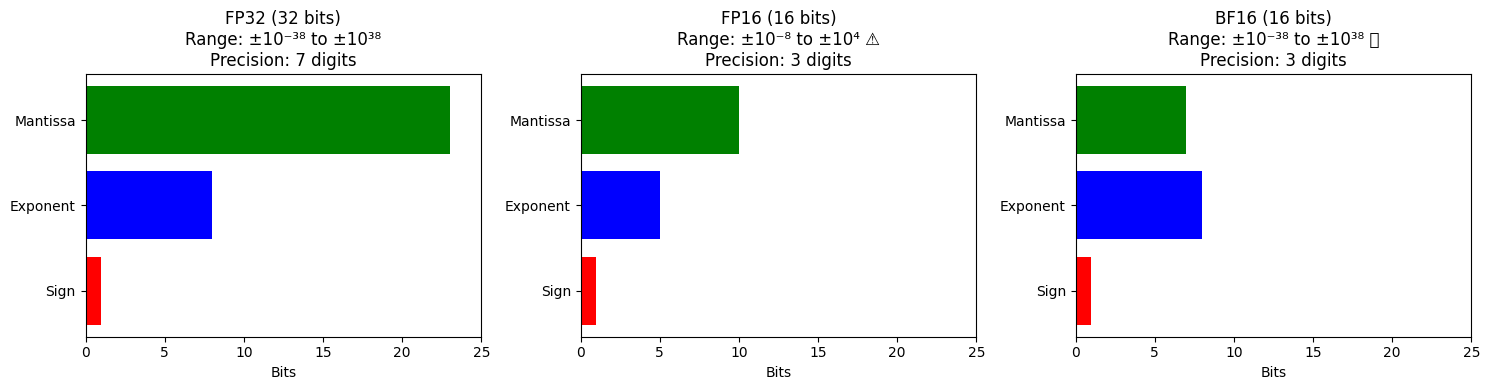
Sign | Exponent (8 bits) | Mantissa (23 bits)
1 | 8 bits | 23 bitsRange: to
Precision: ~7 decimal digits
Memory: 4 bytes per number
FP16 (Half Precision)
Smaller format with less range and precision:
Sign | Exponent (5 bits) | Mantissa (10 bits)
1 | 5 bits | 10 bitsRange: to (65,504 max!)
Precision: ~3 decimal digits
Memory: 2 bytes per number (50% reduction)
Problem: Small gradients (e.g., 10-7) underflow to zero!
BF16 (BFloat16)
Google’s format that keeps FP32 range but reduces precision:
Sign | Exponent (8 bits) | Mantissa (7 bits)
1 | 8 bits | 7 bitsRange: Same as FP32 ( to )
Precision: ~3 decimal digits (less than FP32, same as FP16)
Memory: 2 bytes per number
Advantage: No gradient underflow! (same exponent range as FP32)
Visual Comparison
Matplotlib is building the font cache; this may take a moment.
/tmp/ipykernel_5291/1706644353.py:24: UserWarning: Glyph 9989 (\N{WHITE HEAVY CHECK MARK}) missing from font(s) DejaVu Sans.
  plt.tight_layout()
/opt/hostedtoolcache/Python/3.11.14/x64/lib/python3.11/site-packages/IPython/core/pylabtools.py:170: UserWarning: Glyph 9989 (\N{WHITE HEAVY CHECK MARK}) missing from font(s) DejaVu Sans.
  fig.canvas.print_figure(bytes_io, **kw)
Part 2: Why Naive FP16 Training Fails
The Gradient Underflow Problem
Consider a typical gradient magnitude during training:
# In FP32
gradient = 1.2e-7  # Common in deep networks

# Convert to FP16
gradient_fp16 = np.float16(gradient)
print(gradient_fp16)  # Output: 0.0 ❌
What happened?: FP16’s smallest positive number is . Anything smaller rounds to zero!
Visualization: Gradient Distribution
Loss Overflow Problem
Large activations can exceed FP16’s max value (65,504):
# Softmax output for 1000 classes
logits = torch.randn(1000) * 10  # Common scale
exp_logits = torch.exp(logits)

# Max value
print(exp_logits.max())  # Could be 1e8
print(torch.finfo(torch.float16).max)  # 65,504

# Result: Overflow to inf in FP16!
Part 3: Mixed Precision Training Strategy
The Solution: Use FP16 + FP32 Selectively
Core idea:
Store weights in FP32 (master copy)
Forward pass in FP16 (fast computation)
Loss computation in FP16
Scale gradients to prevent underflow
Update weights in FP32 (accumulated precision)
Gradient Scaling
To prevent underflow, multiply loss by a large constant before backward pass:
# Without scaling
loss = 0.1
gradient = 1e-7  # Would underflow in FP16

# With scaling (scale=1024)
scaled_loss = loss * 1024  # = 102.4
scaled_gradient = 1e-7 * 1024  # = 1.024e-4 (safe!)

# After backward pass, unscale gradients
gradient = scaled_gradient / 1024  # Back to 1e-7 in FP32
Part 4: Automatic Mixed Precision (AMP) in PyTorch
Basic Usage
PyTorch’s torch.amp handles everything automatically:
import torch
from torch.cuda.amp import autocast, GradScaler

model = GPT(config).cuda()
optimizer = torch.optim.AdamW(model.parameters(), lr=1e-4)

# Create gradient scaler
scaler = GradScaler()

for epoch in range(num_epochs):
    for batch in train_loader:
        input_ids = batch['input_ids'].cuda()
        labels = batch['labels'].cuda()

        optimizer.zero_grad()

        # Forward pass in FP16
        with autocast():
            logits = model(input_ids)
            loss = F.cross_entropy(logits.view(-1, vocab_size), labels.view(-1))

        # Backward pass with scaled gradients
        scaler.scale(loss).backward()

        # Unscale gradients and update weights (in FP32)
        scaler.step(optimizer)
        scaler.update()
That’s it! 3 lines of code for 2× speedup.
What Happens Under the Hood?
autocast()context:Casts eligible ops to FP16 (matmul, conv)
Keeps sensitive ops in FP32 (softmax, log, sum)
scaler.scale(loss):Multiplies loss by scale factor (default: 65536)
scaler.step(optimizer):Unscales gradients (divide by scale factor)
Checks for inf/NaN (from overflow)
If valid, updates weights in FP32
If invalid, skips update and reduces scale factor
scaler.update():Adjusts scale factor dynamically
Increases if no overflow detected (max out speedup)
Decreases if overflow detected (improve stability)
Part 5: BF16 vs. FP16
When to Use Each
| Aspect | FP16 | BF16 |
|---|---|---|
| Hardware support | V100, A100, 3090, 4090 | A100, 4090, TPUs |
| Gradient scaling | Required | Optional |
| Numerical stability | Needs careful tuning | More stable |
| Speed | 2-3× faster | 2-3× faster |
| Underflow risk | High (range: 6e-8 to 65k) | Low (same range as FP32) |
Recommendation:
Use BF16 if your hardware supports it (A100, H100, 4090)
Use FP16 for older GPUs (V100, 3090)
BF16 Training in PyTorch
# Switch to BF16 (simpler, no scaler needed!)
for batch in train_loader:
    optimizer.zero_grad()

    with autocast(dtype=torch.bfloat16):
        logits = model(input_ids)
        loss = F.cross_entropy(logits.view(-1, vocab_size), labels.view(-1))

    loss.backward()  # No scaling!
    optimizer.step()
Part 6: Memory Savings Breakdown
FP32 Training (Baseline)
For a 7B parameter model:
| Component | Memory |
|---|---|
| Model weights | 28 GB |
| Gradients | 28 GB |
| Optimizer states (AdamW) | 56 GB |
| Activations | 10 GB |
| Total | 122 GB |
Mixed Precision Training
| Component | Memory | Savings |
|---|---|---|
| Model weights (FP32 master) | 28 GB | - |
| Model weights (FP16 copy) | 14 GB | - |
| Gradients (FP16) | 14 GB | 50% |
| Optimizer states (FP32) | 56 GB | - |
| Activations (FP16) | 5 GB | 50% |
| Total | 117 GB | ~5 GB saved |
Wait, that’s not much!
Reality: Optimizer states dominate (56 GB). To save more, need optimizer-level changes (see ZeRO optimizer, future lesson).
But: 2-3× speed improvement is the real win!
Part 7: Speed Benchmarks
Realistic Training Speed
GPT-2 (124M parameters) on A100:
| Precision | Throughput | Speedup |
|---|---|---|
| FP32 | 15,000 tokens/sec | 1.0× |
| FP16 | 42,000 tokens/sec | 2.8× |
| BF16 | 40,000 tokens/sec | 2.7× |
Visualization: Training Time Comparison
Part 8: Common Pitfalls and Solutions
Pitfall 1: Loss Scaling Too Aggressive
Symptom: NaN losses after a few steps
# Check scaler state
print(f"Current scale: {scaler.get_scale()}")
# If this keeps decreasing to 1.0, training is unstableSolution: Start with lower initial scale
scaler = GradScaler(init_scale=1024) # Default is 65536Pitfall 2: Gradient Clipping with AMP
Wrong order causes NaN:
# ❌ WRONG
scaler.scale(loss).backward()
torch.nn.utils.clip_grad_norm_(model.parameters(), max_norm=1.0)
scaler.step(optimizer)

# ✅ CORRECT (unscale first!)
scaler.scale(loss).backward()
scaler.unscale_(optimizer)  # Unscale before clipping
torch.nn.utils.clip_grad_norm_(model.parameters(), max_norm=1.0)
scaler.step(optimizer)
Pitfall 3: Custom Operations
Some ops don’t have FP16 kernels:
# Force FP32 for specific ops
with autocast():
    logits = model(input_ids)  # FP16

    # Custom loss that needs FP32
    with autocast(enabled=False):
        loss = custom_loss_fn(logits.float(), labels.float())
Part 9: Monitoring Mixed Precision Training
Key Metrics to Track
# Track gradient scale changes
if step % 100 == 0:
    print(f"Step {step}, Scale: {scaler.get_scale()}")

# Track skipped updates (inf/NaN detections)
if scaler._found_inf_per_device(optimizer):
    print("Warning: Skipped update due to inf/NaN")

# Track loss magnitude
print(f"Loss: {loss.item():.6f}")  # Should stay in reasonable range
Healthy training:
Scale stays high (16384-65536)
Few/no skipped updates
Loss decreases smoothly
Unhealthy training:
Scale keeps dropping to 1.0
Frequent skipped updates
Erratic loss
Part 10: Production Checklist
Mixed Precision Best Practices
✅ Use autocast() for forward pass
✅ Use GradScaler for backward pass
✅ Unscale before gradient clipping
✅ Keep master weights in FP32
✅ Monitor scale factor and skipped updates
✅ Use BF16 if hardware supports it
✅ Profile to verify speedup (use torch.profiler)
Full Production Example
import torch
from torch.cuda.amp import autocast, GradScaler
from torch.utils.tensorboard import SummaryWriter

model = GPT(config).cuda()
optimizer = torch.optim.AdamW(model.parameters(), lr=1e-4)
scaler = GradScaler()
writer = SummaryWriter()

for step, batch in enumerate(train_loader):
    optimizer.zero_grad()

    # Mixed precision forward
    with autocast(dtype=torch.float16):
        logits = model(batch['input_ids'].cuda())
        loss = F.cross_entropy(
            logits.view(-1, vocab_size),
            batch['labels'].cuda().view(-1)
        )

    # Scaled backward
    scaler.scale(loss).backward()

    # Gradient clipping
    scaler.unscale_(optimizer)
    torch.nn.utils.clip_grad_norm_(model.parameters(), max_norm=1.0)

    # Optimizer step
    scaler.step(optimizer)
    scale_before = scaler.get_scale()
    scaler.update()

    # Logging
    if step % 100 == 0:
        writer.add_scalar('Loss', loss.item(), step)
        writer.add_scalar('GradScale', scale_before, step)
print(f"Step {step}, Loss: {loss.item():.4f}, Scale: {scale_before:.0f}")Summary
Mixed precision uses FP16/BF16 for speed, FP32 for stability
FP16 requires gradient scaling to prevent underflow
BF16 more stable (same range as FP32) but needs newer hardware
PyTorch AMP makes it 3 lines of code:
autocast()+GradScalerSpeed: 2-3× faster with minimal code changes
Memory: ~5 GB saved (bigger wins need optimizer changes)
Monitor gradient scale and skipped updates
Next Steps: For the advanced Scaling & Optimization series, we’ll cover:
L16: Attention optimizations (Flash Attention, KV cache)
L17: Model parallelism (data/pipeline/tensor parallelism)
L18: Long context handling (RoPE, ALiBi)
L19: Quantization for inference (INT8, INT4, GPTQ)
L20: Deployment & serving (vLLM, continuous batching)